Pretrained keypoint detection models are powerful, but they are almost exclusively trained on human pose estimation tasks. If you need to detect interest points on objects, machinery, vehicles, or domain-specific subjects, you need to train your own. This guide walks through the complete process: from data strategy and annotation to framework selection and inference configuration, with working PyTorch code included.
What Is Keypoint Detection?
Keypoint detection models identify specific points of interest in an image: joints, corners, landmarks, or any semantically meaningful location you define. Most popular applications of artificial intelligence and machine learning in computer vision include image classification, object detection and segmentation. But when you need to estimate pose, angles, and dimensions of objects rather than simply classify or bound them, keypoint detection is the right approach.
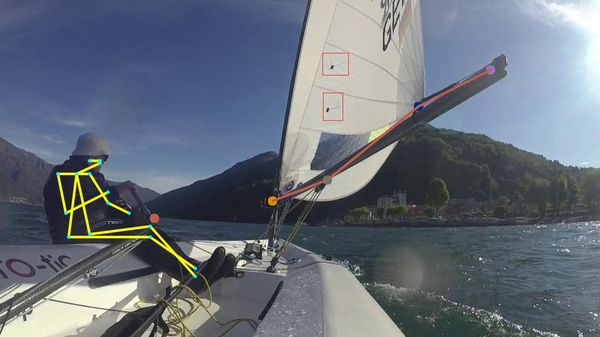
Neural network-based models, and particularly R-CNN (Region-based Convolutional Network) architectures, are the current best practice for keypoint detection accuracy. While human pose estimation is the most well-known application, the same architecture generalises well to object pose detection: we have used it ourselves to detect and estimate the position of sailing boat components in real time.
Use Cases and Applications
Keypoint detection models are valuable across a broad range of domains:
- Sports analytics: tracking athlete and equipment pose, detecting technique flaws
- Healthcare: medical imaging, rehabilitation monitoring, surgical guidance
- Industrial automation: defect detection, assembly verification, robotic guidance
- E-commerce: body pose estimation for virtual try-on experiences
- Autonomous systems: object orientation estimation for navigation and manipulation
Cost, Time and Effort to Train a Keypoint Detection Model
Before commissioning a keypoint detection model, it helps to understand the typical effort and costs involved. The numbers vary considerably by use case, but the table below gives a realistic picture for developing a first working prototype, enough to validate feasibility and surface the main challenges before investing in a production-grade system.
| Activity | Task | Estimated Effort |
|---|---|---|
| Data acquisition | Capture 50–100 representative images | 1–2 days (spread over time to capture variation) |
| Annotation/labelling | Mark bounding boxes and keypoints per image | 1–2 hours for 50–100 images |
| Model training | Configure and train keypoint detector (default approach) | ~1 day using a standard framework |
| Evaluation & iteration | Review results, adjust configuration, retrain | 0.5–2 days depending on quality targets |
This is intentionally conservative. The goal of a prototype is to get a working model quickly so you can identify domain-specific challenges. Production-grade models require more data, more rigorous annotation, and a proper MLOps deployment pipeline. If you would like a more accurate estimate for your specific use case, get in touch with us.
Data Strategy for Training a Keypoint Detection Model
Custom Data Acquisition
The standard approach is to capture images specifically for your use case. Both images and annotations are required for training.
Start by photographing the object with the keypoints under varied conditions: different angles, environments, and lighting. Variation is essential: a model trained only on well-lit studio shots will underperform in the field. For a first prototype, 50–100 images is a practical starting point. As you resolve annotation and architecture issues, scale up incrementally.
The next step is labelling the data. You need to mark both the bounding box of the object and the pixel coordinates of each keypoint. This is time-consuming and repetitive work. For a prototype, it often pays to do it in-house so you fully understand the annotation process and edge cases before outsourcing at scale. Accurate, consistent labels are critical, as label noise is one of the most common causes of poor model performance.
Using Simulated Images
When real-world data acquisition is impractical (due to cost, safety constraints, or rarity of the scenario) simulated images are a powerful alternative. Using Python to script a 3D rendering engine such as Blender, you can generate photo-realistic images of objects at arbitrary poses, with keypoint coordinates known automatically from the rendering parameters.
The key advantage: no manual annotation required, and the dataset can be scaled to thousands of images almost instantly. Data augmentation can then add further variation (brightness, blur, occlusion) to improve generalisation to real-world conditions.
Using Existing Public Datasets
It is always worth checking whether a suitable public dataset already exists. The COCO dataset is the most widely used benchmark for keypoint detection, but domain-specific datasets exist for medical imaging, industrial inspection, and sports applications. Using a public dataset, even partially, can significantly reduce annotation effort and provide a stronger starting point for transfer learning.
Annotation Tools for Keypoint Detection
Once you have your images, you need an annotation tool that supports keypoint labelling. A popular open-source choice is COCO Annotator, which supports bounding boxes and keypoints natively and exports in COCO JSON format, which most frameworks can consume directly. For teams needing more enterprise features, Labelbox and Scale AI offer managed annotation workflows.
Frameworks for Training a Keypoint Detector
Two frameworks dominate practical keypoint detection work:
Detectron2
Detectron2 is Facebook’s AI library covering object detection, segmentation, and keypoint detection. The Detectron2 model zoo includes pretrained keypoint R-CNN weights on the COCO person dataset. It provides detailed documentation for registering custom datasets and configuring the training process. Detectron2 is a strong choice when you want a battle-tested, configurable pipeline with minimal custom code.
PyTorch
PyTorch provides a KeypointRCNN implementation in torchvision that can be fine-tuned on custom datasets. It offers more flexibility than Detectron2 for custom architectures and is easier to integrate into broader Python ML pipelines. The rest of this guide focuses on PyTorch.
How to Train a Custom Keypoint Detector with PyTorch
Prepare the Data
The keypoint detection model requires images and corresponding annotations. Annotations must include the bounding box of each object instance and the pixel coordinates of each keypoint. If using videos, extract relevant frames first.
Data augmentation is highly recommended: random flips, brightness shifts, and scale jitter all add variation that helps the model generalise. This is especially important when your dataset is small.
Using the PyTorch Dataset and DataLoader
PyTorch’s Dataset class provides a clean abstraction for loading images and annotations. The implementation below loads images from disk, converts them to tensors, and returns bounding boxes, keypoint coordinates, and class labels in the format expected by KeypointRCNN:
class KeypointsDataset(Dataset):
    def __init__(self, img_dir: Path, annotations_dir: Optional[Path] = None):
        self.img_dir = img_dir
        self.annotations_dir = annotations_dir
        self.images = sorted(list(self.img_dir.iterdir()))
        self.annotations = None
        if annotations_dir:
            self.annotations = []
            for image in self.images:
                self.annotations.append(self.annotations_dir / f"{image.stem}.json")

    def __len__(self):
        return len(self.images)

    def __getitem__(self, idx):
        image = Image.open(self.images[idx])
        image_tensor = ToTensor()(image)
        target = {}
        if self.annotations:
            with open(self.annotations[idx], "r") as f:
                annotations = json.load(f)
            target = {
                "boxes": torch.Tensor([a["box"] for a in annotations]),
                "keypoints": torch.Tensor([a["keypoints"] for a in annotations]),
                "labels": torch.Tensor([1 for _ in annotations]).type(torch.int64),
            }
        return image_tensor, target
Pair this with PyTorch’s standard DataLoader. You will likely need a custom collate_fn to correctly batch variable-length annotation lists.
Configure the KeypointRCNN Model
The KeypointRCNN model exposes several important configuration parameters:
- Backbone architecture: determines how features are extracted. ResNet-50 is the default and the only backbone that currently ships with pretrained COCO weights. More complex backbones improve accuracy at the cost of inference throughput.
- Number of keypoints: must match the number of interest points defined in your annotations.
- Number of classes: always set to N + 1 to account for the background class. For a single-object detector, this is 2.
- Max detections per image: constraining this reduces noise at inference time if you know the expected density of objects in your scene.
Training the Model
Split your data into training and validation sets. A GPU with CUDA support will reduce training time dramatically. During training, monitor both training loss and validation loss across epochs. If keypoint loss remains at zero, the most common cause is a misconfigured number of classes (check that class labels do not use 0, which is reserved for background) or annotations that do not align with the configured keypoint count.
PyTorch’s torch.save / torch.load allows you to checkpoint models at regular intervals, enabling manual evaluation mid-training and clean resumption from any epoch.
Configure the Inference Pipeline
Once trained, two inference-time parameters have the most impact on output quality:
box_score_thresh: the detection confidence threshold. Increase this if you are seeing too many spurious detections; decrease it if the model misses valid objects.box_nms_thresh: the non-maximum suppression threshold controlling overlap between predicted boxes. Reduce this if a single object instance is being returned multiple times.
Once your model is performing well, consider exporting to ONNX for runtime-agnostic deployment, or using TorchScript for integration into production Python services without requiring a full PyTorch installation.
How adagger Can Help
Training a keypoint detection model on a custom dataset involves considerably more than running a training script. Data strategy, annotation quality, architecture selection, and production deployment all require experienced judgement to get right efficiently.
At adagger, we have built keypoint detection systems for sports analytics, industrial inspection, and autonomous applications. We can help you design the data acquisition pipeline, manage annotation at scale, select and configure the right architecture for your accuracy and latency requirements, and deploy the model as a production API, containerised, monitored, and ready to integrate with your product.
Contact us to discuss your keypoint detection project. We are happy to advise on feasibility, scope, and the fastest path to a working prototype.
Conclusion
Keypoint detection is a powerful computer vision capability that extends well beyond human pose estimation. With the right data strategy, annotation process, and framework configuration, it is feasible to train a custom model from a modest dataset and achieve production-quality results. PyTorch and Detectron2 provide mature, flexible implementations that can be adapted to a wide range of domain-specific use cases. The main investment is in data quality and annotation discipline, not in modelling complexity.